Dreadnought

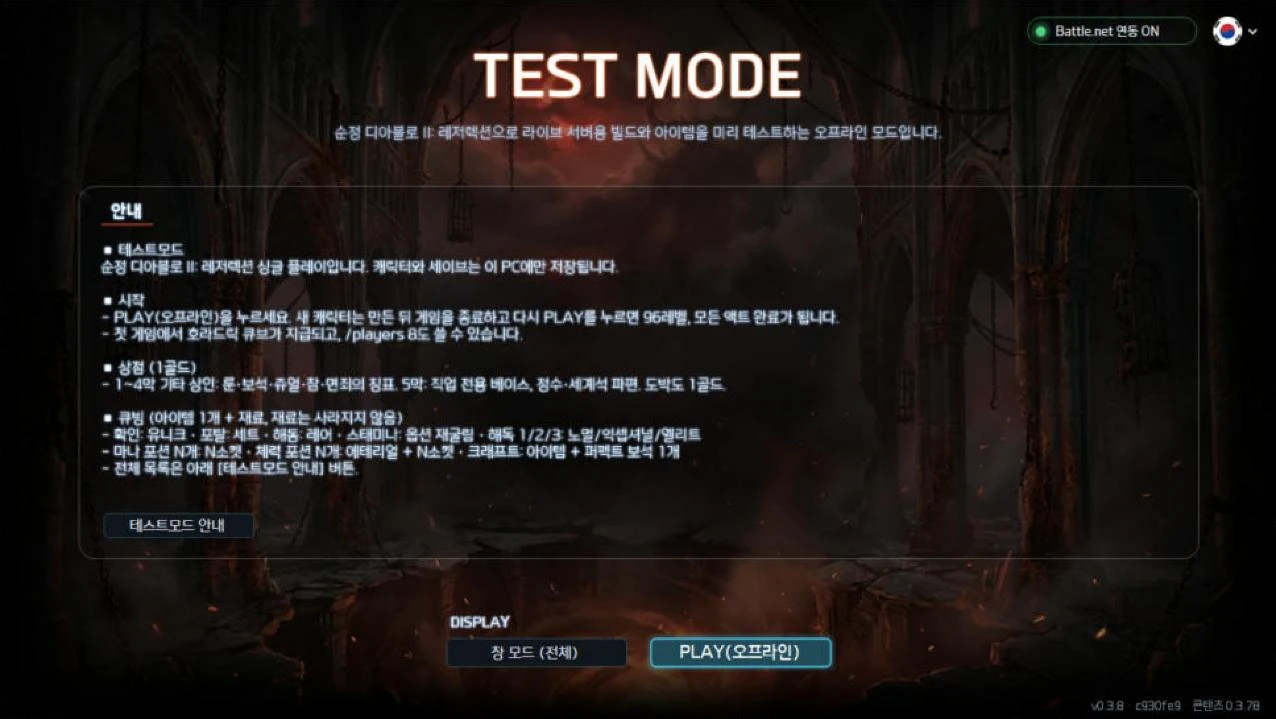
Test ModeSingle-player D2R as shipped for build and item tests · 1-gold vendors and gambling, special cube recipes, level 96 at once · sign up, install the "D2R 테스트모드" launcher, log in, press PLAY(오프라인).

Log in to download

Test Mode

Single-player Diablo II: Resurrected as shipped, plus material vendors, 1-gold gambling and special cube recipes. Build any gear you want and try your build.

What is different

The game as shipped

No balance changes - the game exactly as shipped, so you can test a build for the live servers. Characters and saves are kept separately.

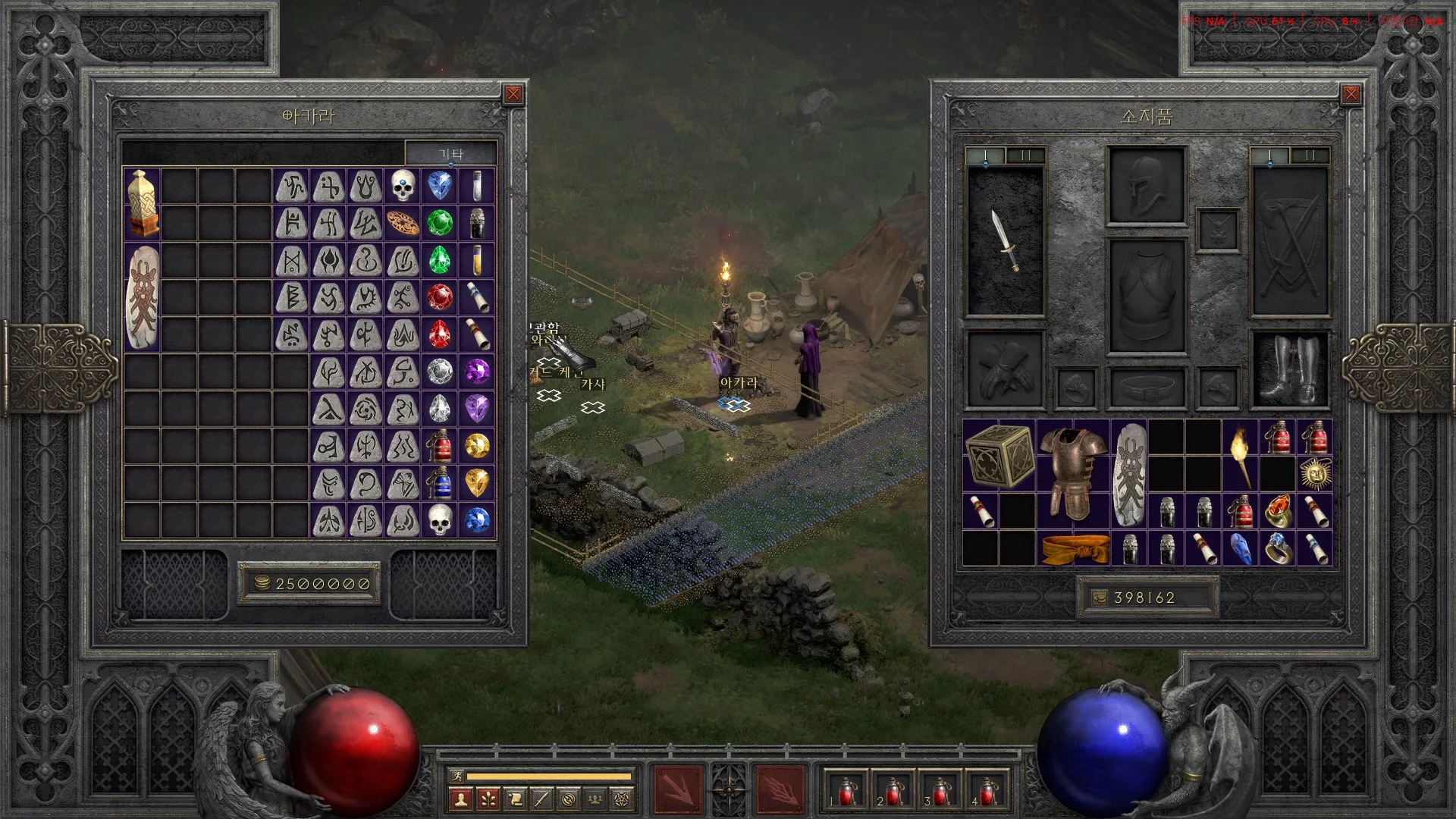
Material vendors (all 1 gold)

Acts 1-4 misc vendors (Akara, Drognan, Ormus, Jamella): every rune, gems and skulls, magic jewels, the three magic charms, the Token of Absolution; Akara also the five worldstone shards. Act 2 Fara: exceptional and elite class weapons. Act 5 Malah: the four essences, Tome of Town Portal, Tome of Identify. Act 5 Larzuk and Anya: class item bases. The same in Normal, Nightmare and Hell.

Gamble bases for 1 gold

Every gamble costs 1 gold. Buy the base you want and pick its tier with antidote potions (1 normal, 2 exceptional, 3 elite).

Special cube recipes

Turn a base into a unique, set or rare item, reroll its options, set its sockets and make it ethereal. The catalysts are never used up. Crafting takes the item (magic, rare or crafted - craft it again) and one perfect gem (rings and amulets also the rune; no jewel), and the materials come back.

A head start

Your first game gives you a Horadric Cube and gold.

Level 96 at once

Create a character, quit the game and start again: the character is level 96 with every act, quest and waypoint done.

Terror zones everywhere

Every area is always a terror zone, and every monster in it is Cursed.

/players 8 works

It is single player, so type /players 8 in chat to set the player count (1-8): test against monster life and drops of an eight-player game.

Special cube recipes (one item + catalysts)

Scrolls and potions are never used up. Take socketed runes and gems out first. Put only the one item and its catalysts in the cube.

1 Scroll of Identifya unique of that base (random if several)
1 Scroll of Town Portala set item of that base
1 Thawing Potiona rare of that base
1 Stamina Potionrerolls the options only (magic and rare at item level 99+, uniques and set items keep the item - upgraded sunder charms too)
1 / 2 / 3 Antidote Potionsa white normal / exceptional / elite base
1-6 Mana Potionsthat many sockets (a Tome of Town Portal counts as 4)
1-6 Healing Potionsethereal + that many sockets (a Tome of Identify counts as 4)
ring + 2 Scrolls of IdentifyThe Stone of Jordan
amulet + 2 Scrolls of IdentifyMara's Kaleidoscope
amulet + 1 Scroll of Identifya random unique amulet
small charm + 1 Scroll of IdentifyAnnihilus
large charm + 1 Scroll of IdentifyHellfire Torch
any grand charm + 1 Scroll of IdentifyGheed's Fortune or one of the six upgraded sunder charms, at random and never the one it already is - cube the result again to change it again
grand charm + 1 Tome of Town Portala magic grand charm: +1 to a random skill tree (any class) and +45 life
Token of Absolution + El / Eld / Tir / Nef / Eth runeWestern / Eastern / Southern / Deep / Northern Worldstone Shard
class item + 1 Scroll of Identifya unique of that item kind (normal bases too)
Crafting: item + 1 perfect gema crafted item, the gem comes back. Magic, rare or crafted; no jewel (rings and amulets also take the recipe's rune, which comes back too). Sapphire = Hit Power, Ruby = Blood, Amethyst = Caster, Emerald = Safety (bases as in the original crafting recipes). Put only the item and the gem (and the rune) in the cube - the original way with a jewel and a rune works too, but uses them up
Download

The test-mode launcher "D2R 테스트모드", installed apart from other launchers. Members only: sign up, log in and download; log in to the launcher with the same account. Only D2RLoader and a mod folder are added to the game folder; saves are kept apart from your Battle.net characters.

Log in to download

Getting started

  1. 1Sign up on this site and log in - the launcher uses the same account.
  2. 2Download and install the test-mode launcher ("D2R 테스트모드"); it sets up the test mode and D2RLoader by itself.
  3. 3Log in to the launcher and press PLAY(오프라인) (= offline): the game starts as single player.
  4. 4A new character becomes level 96 once you quit the game and press PLAY(오프라인) again.

Videos

Download or launch blocked?

The installer comes from a small project without a code-signing certificate, so browsers and Windows flag it as an uncommon file. Allow it with the steps below — just make sure the file matches the SHA-256 shown on this page.

Chrome

The download list says the file may be dangerous or is not commonly downloaded

  1. 1Click the download icon (↓) at the right of the address bar.
  2. 2Click ⋮ or the warning text next to the file.
  3. 3Choose Keep / Download anyway (on some versions Download dangerous file).
  4. 4Run the file when the download finishes.

If it is gone from the list, open chrome://downloads and allow it there.

Edge

Edge says the file isn't commonly downloaded or could harm your device

  1. 1In the downloads panel, hover the file and click ⋯.
  2. 2Choose Keep.
  3. 3In the dialog click Show more, then Keep anyway.
  4. 4Run it with Open file.

Edge's SmartScreen warns about new files that few people have downloaded yet.

Blue window — Windows protected your PC (SmartScreen)

A blue ‘Windows protected your PC’ window appears when you run it

  1. 1Click More info inside the window.
  2. 2The publisher shows as ‘Unknown publisher’ — expected, the file is not signed.
  3. 3Click the Run anyway button that appears.
  4. 4Answer Yes to User Account Control.

Red window — blocked or quarantined

A red ‘This app has been blocked for your protection’ / ‘Threat found’ appears, or the file disappears

  1. 1Right-click the file → Properties → tick Unblock at the bottom → OK, then run it again.
  2. 2If the file vanished: Windows Security → Virus & threat protection → Protection history → the entry → Actions → Allow on device or Restore.
  3. 3With another antivirus, restore it from that program's quarantine or add an exclusion.
  4. 4‘Smart App Control blocked’ (Windows 11) cannot be bypassed this way, and turning it off is hard to undo — ask in the Forum first.

Before allowing anything, check below that the SHA-256 matches this page.

Check it is the original file (SHA-256)

Open PowerShell in your Downloads folder, run the command and compare the result with the SHA-256 on this page.

Get-FileHash .\D2RTestMode-Setup-0.3.10.exe -Algorithm SHA256

SHA-256 · 36634f34790cedbc34dfc08b5a4ffefef997001fd98fb499673c2b2a859e08d0